Title here
Summary here
This guide provides an overview of Forq’s features and design. This is a mandatory read to understand the capabilities and limits of Forq!
Forq is a message queue service. As other MQs, it allows you to send messages to the queues, and consume them from the queues. So, unlike the request-response pattern, where the client sends a request and waits for the response, in the message queue pattern, the client sends a message to the queue and continues its work. The consumer will process the message later.
Forq is backed by SQLite, which means that the messages are persisted to disk, and will survive a server restart.
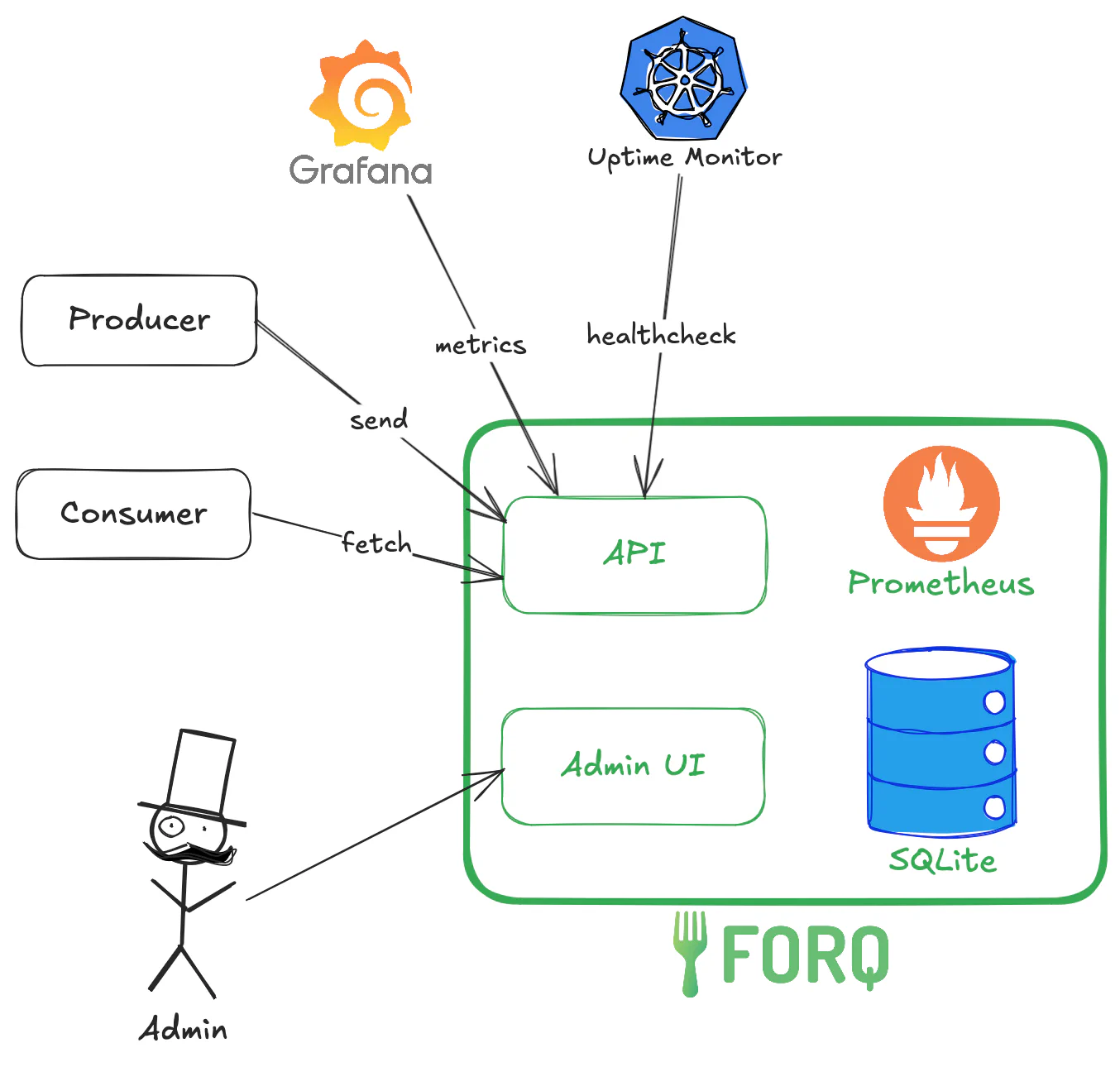
The green boxes represent the Forq service, which consists of:
All of this is a single binary (or a Docker container) that you can run on your server.
The dark boxes and arrows represent the external clients that interact with Forq:
There are 2 types of queues in Forq:
These are the main queues where you send and receive messages. They support multiple producers and consumers.
By default, standard queues have a TTL (time-to-live) of 24 hours,
which means that messages that are not processed within 24 hours will be moved to the Dead Letter Queue (DLQ).
You can change the TTL by setting the FORQ_QUEUE_TTL_HOURS environment variable.
These are special queues where messages that could not be processed successfully are sent.
Each standard queue has its own DLQ. The DLQ name is the standard queue name with the suffix -dlq.
There are two ways how to process messages in the DLQ:
By default, DLQs have a TTL of 168 hours (7 days), which means that messages that are not processed within 7 days will be deleted.
You can change the TTL by setting the FORQ_DLQ_TTL_HOURS environment variable.
If you are interested to learn more about internal implementation of queues, check out the Internals Guide.
Messages in Forq are strings, with a maximum size of 256 KB. Forq is chill about the message content, so you can send any string you want, including JSON, XML, or plain text.
A message in Forq goes through the following states:
“Virtual state” means that if you look at the DB, there won’t be such a state there. For DB, the message is either Ready, Processing, or Failed. The other states are just a way to describe the message lifecycle.
Forq uses HTTP protocol for its API, which means that you can use any HTTP client to interact with it. Which makes it exposable to the attacks, like DDoS.
Forq doesn’t have any built-in rate limiting, so that’s on you. If you are running Forq in production, make sure to put it behind a reverse proxy (like Nginx or Traefik), Load Balancer or Cloudflare, and enable rate limiting there.
Forq uses SQLite as its DB, which is a file-based DB. When you run the Forq server, the logs will tell you where the DB files are located (it depends on the OS). It’s your task to back those files.
It’s not the best idea to simply copy those files. Instead, SQLite has a built-in backup API that you can use to create a consistent backup of the DB. You can find more information about it in the SQLite documentation.
It’s basically smth like this (if you are in the same directory where forq.db is located):
now = date +"%Y%m%d%H%M%S"
sqlite3 forq.db ".backup 'forq_backup_$now.db'"
Use the backup API together with a cron job to create regular backups of the DB. Built-in Linux cron is good enough for that. It’s a good idea to back up files to a remote location, like Cloudflare R2, AWS S3, Google Cloud Storage, or any other place outside the server where Forq is running.
If that sounds too complicated, ask AI to assist, it’s just a few lines of Bash script.